


As excited as I am to see the changing of the guard in the White House, I can't resist pointing out a few significant accessibility problems with the newly unveiled whitehouse.gov website.
The good news: There's a changing of the guard! So I'm hopeful and optimistic that these problems will be fixed. This isn't just blind optimism either. Videos on change.gov were initially not captioned, but the accessibility community raised the transition team's awareness of this issue, and the problem was promptly fixed.
The biggest accessibility problems I see are related to color contrast, particularly in the banner, and keyboard accessibility overall. There's no visible focus other than what's provided by the browser and in most browsers that's so minimal that it's of little value. Mouse users, note how easy it is to select an item from the navigation menu, just by hovering and clicking. Now try accessing these same features without a mouse, just by using the Tab and Enter keys. It's possible, but difficult and not at all efficient. There are lots of mouseless people who are effected by this: People with physical disabilities, people using a stylus, people using speech recognition, etc.
In my opinion, the biggest problem is the Contact Us form, and I'll dwell on that a bit here because it provides a perfect example of why it's important to use accessible markup on forms. It's a pretty straightforward form, with fields for first name, last name, email, address, city, state, zip+4, phone, subject, and message:
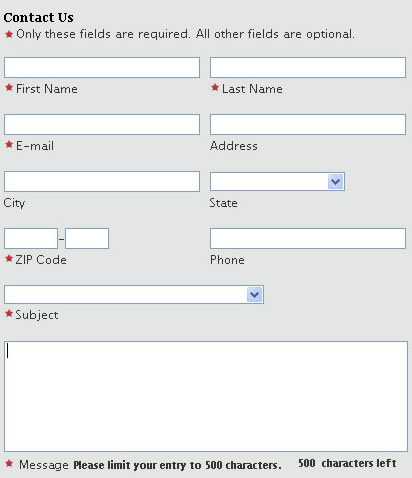
The problem with this form is that the labels appear beneath the fields they represent. This in itself wouldn't be a problem if they had used accessible markup. When a screen reader encounters a form field, it first looks to see if there is an HTML <label> element associated with that form field. If there isn't, the screen reader has to guess which label accompanies the field. For sighted users, it's clear that the text positioned immediately beneath a field is the label for that field, but if you strip all positioning away and read the form linearly, that's not so obvious. Most forms have labels before form fields, so that's what screen readers automatically assume. In this case, that erroneous assumption results in the screen reader reading the form incorrectly, which may in turn result in blind citizens either filling the form out incorrectly, or getting confused and not filling it out at all. Here's a summary of what happens when JAWS 9 reads this form (note that the word "Edit" is how JAWS identifies a form field):
- For both First and Last Name fields, JAWS reads "Only these fields are required. All other fields are optional Edit"
- For the E-Mail field, JAWS reads "Last Name Edit"
- For the City field, JAWS reads "Address Edit"
- For the first portion of the Zip+4 field, JAWS reads "State Edit"
- For the second portion of the Zip+4 field, JAWS reads "Dash Edit"
- No labels are read for any of the fields in the right column. JAWS just says either "Edit" or "Combo Box". Most screen reader users can probably figure out the State field since the combo box contains choices. The other fields require significantly more guesswork.
- For the Message field, JAWS reads "Subject Edit"
The solution is simple, and again, I suspect it will be implemented soon and this blog post will be obsolete. Here's the current HTML code that's used to implement the First Name field, and the label associated with it. Note that I've stripped out most of the surrounding table tags, as they're not relevant to the point I'm making:
<input type="text" style="width: 192px;" id="ctl05_txtFirstName" maxlength="50" name="ctl05$txtFirstName"/>
<td class="fieldreq" id="ctl05_labeltxtFirstName">First Name</td>
To fix this, simply add a label element informing screen readers that "Last Name" is a label, associated with the form field having id="ctl05_txtFirstName", like this:
<input type="text" style="width: 192px;" id="ctl05_txtFirstName" maxlength="50" name="ctl05$txtFirstName"/>
<td class="fieldreq" id="ctl05_labeltxtFirstName"><label for="ctl05_txtFirstName">First Name</label></td>
Anyone else have feedback (negative or positive) for the Obama web team?






No comments:
Post a Comment