


Greetings from CALWAC 2009. I'm preparing for a presentation on multimedia accessibility, and figure this seems like as good a time as any to write my fourth in a series of blog posts describing my efforts to create a DO-IT Video Search
application that is fully conformant to the World Wide Web Consortium's (W3C) Web Content Accessibility Guidelines.
This installment explores an aspect of multimedia accessibility that receives far too little attention: audio description. When people think about making video accessible, they tend to think about captions for the deaf and hard of hearing. However, video can also be inaccessible to people who are blind or visually impaired. These folks can often get the message of a video solely by listening to it. However, if portions of the content are exclusively communicated visually, these portions are inaccessible. For example, just yesterday I was watching a molecular biology lecture on YouTube, in which the professor was referring to (and pointing to) molecules that he had diagrammed on the blackboard:
This molecule here is able to dissolve certain compounds,
whereas this molecule, which has large arrays of these kinds of bonds, is relatively
insoluble in water.
In the context of this professor's lecture, you too are blind, and consequently you learned nothing from the above sentence. People who can see the video learn lots about different kinds of molecules.
The best solution with a videotaped lecture is for the lecturer to be sensitive to the fact that not everyone can see their content, and to verbalize it accordingly. In a live lecture, there may be people with poor eyesight who can't see the tiny print on the slides or the scribbles on the blackboard; or there may be people with perfect vision who are disabled by virtue of their seat in the back of the room. A videotaped lecture is no different: There are sure to be some people in the audience who for whatever reason can't see the content visually, so that content should be described.
After the video has been created, if there is still visual content that is not accessible, a separate audio track must be added that describes or narrates the visual content. This is known by various names, including audio description, video description, descriptive narration, and sometimes Descriptive Video Service (DVS), although the latter is a trade name of WGBH in Boston, a leading provider of audio description services.
Audio description is required for conformance to WCAG 2.0 at the most basic level
(Level A). It's also required by the Section 508
standards, standards written explicitly for federal agencies who are required by
law to ensure accessibility of their information technology resources.
We at DO-IT have always taken two steps toward ensuring the accessibility of our
videos for people who can't see them:
- We minimize the amount of content that is not described as part of the program
audio. - We hire the services of an audio description vendor to add narration where it's required.
We have always delivered our audio description in a separate video. Therefore, we
(and our users) have two videos to manage: one with audio description, and one
without. In my view, this isn't a perfect scenario. I would rather provide one video for all users, and provide a mechanism by which users can toggle audio description on and off, just like they can closed captions.
That's why I'm excited about JW FLV Player, a
Flash player developed by Jeroen Wijering which several versions ago began
supporting audio description. The image below shows a snapshot of the JW FLV
Player version 3.16. The player controller bar includes both a closed caption button
(symbolized by the letter "T") and an audio description button (symbolized by the
letter "A"). On a technical level, audio description in this player is very easy to implement. Just create an MP3 file that contains the narration, then pass an audio variable to the player that tells the player that an audio description MP3 file is available and where to find it. Who knew audio description could be so easy? Now everyone should be doing it!
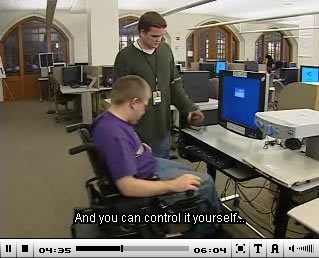
We've done it on a few of our most recent videos, including Equal Access: Universal Design of Computer Labs. Note that in order to watch this video with closed audio description, you will need to select Preferences and check both Audio Description and Closed Audio Description. For your preferred player, select JW FLV Player 3.16 if you want to see the closed caption and audio description toggle buttons as in the above image (no buttons in later versions = a bug that will be fixed soon). Alternatively, select JW FLV Player 4.2 for an improved audio experience (as described below).
There are two major problems with closed audio description:
Foreground vs. Background Volume
Adding audio description by laying an MP3 over the original program audio is an oversimplified solution. Audio description professionals typically remix the program audio, adjusting volumes as needed so the narration can easily be heard over background sounds. Version 4.2 of JW FLV Player introduced the ability to set the volume of the audio description independently of the program audio. This is done when the player is initialized - it can't be adjusted by the user on the fly. However, it's a step in the right direction. Now we can crank the audio description, and turn down the program audio a notch, so the audio description can be heard.
Maybe it's technically possible for the player to listen to the program audio (background) and audio description (foreground) and intelligently adjust these volumes to match a pre-defined ratio between the two. That sounds challenging, but do-able.
Alternatively, a solution that's already possible with the existing player would be to add an audio MP3 that contains the entire program audio remixed with audio description, rather than an MP3 that only contains the audio description. The player could be initialized with this separate audio track set to a high volume, and the original program audio set to 0. This same solution can be used for providing versions of the program translated into alternate languages.
Extended Audio Description
In cases where there isn't enough quiet time in the program audio to insert audio description, the standard practice is to apply extended audio description, a process by which the video is paused briefly and audio description is inserted into the pause. Integrating this functionality into a one-video-for-all-users solution is not impossible, but would seem to be a rather daunting problem.
Given these challenges, I think the simplest approach for us is to provide two versions as we always have, one with audio description and one without. The version that users receive is controlled by a user preference.
However, this unfortunately doesn't sound as simple as recording a simple narration and feeding it to the player as an MP3. So after all this talk, I'm still puzzled. What is it going to take to get everyone who creates a video to add captions and audio description to that video?






No comments:
Post a Comment